


Blogging involves much more than writing. You need to find topics, research information, create outlines, draft articles, optimize them for search, edit your writing, and create visuals. Doing all of this manually can take hours for a single post.
The good news is that you don’t need an expensive AI software stack to speed up your blogging workflow.
The best AI tools for bloggers can help with research, content planning, writing, editing, SEO, keyword research, and visual content. Many offer free access, making them especially useful if you’re building a new blog and want to keep your software costs low.
In this guide, we’ll look at 7 AI and supporting tools for bloggers, what each one is best for, its limitations, and how to use it as part of a practical blogging workflow.
The goal isn’t to let AI run your blog on autopilot. It’s to use AI for repetitive or time-consuming tasks while keeping your research, judgment, experience, and final editorial decisions at the center.
Best AI Tools for Bloggers at a Glance
| Tool | Best for | Free access | Best blogging task |
|---|---|---|---|
| Perplexity | Research | Yes | Topic research and source discovery |
| ChatGPT | Ideas and planning | Yes | Brainstorming and outlines |
| Claude | Long-form writing | Yes | Drafting and rewriting |
| Rank Math | WordPress SEO | Yes | On-page SEO |
| Canva | Blog graphics | Yes | Featured images and visuals |
| Grammarly | Editing | Yes | Grammar and readability |
| Google Keyword Planner | Keyword research | Yes | Finding search terms |
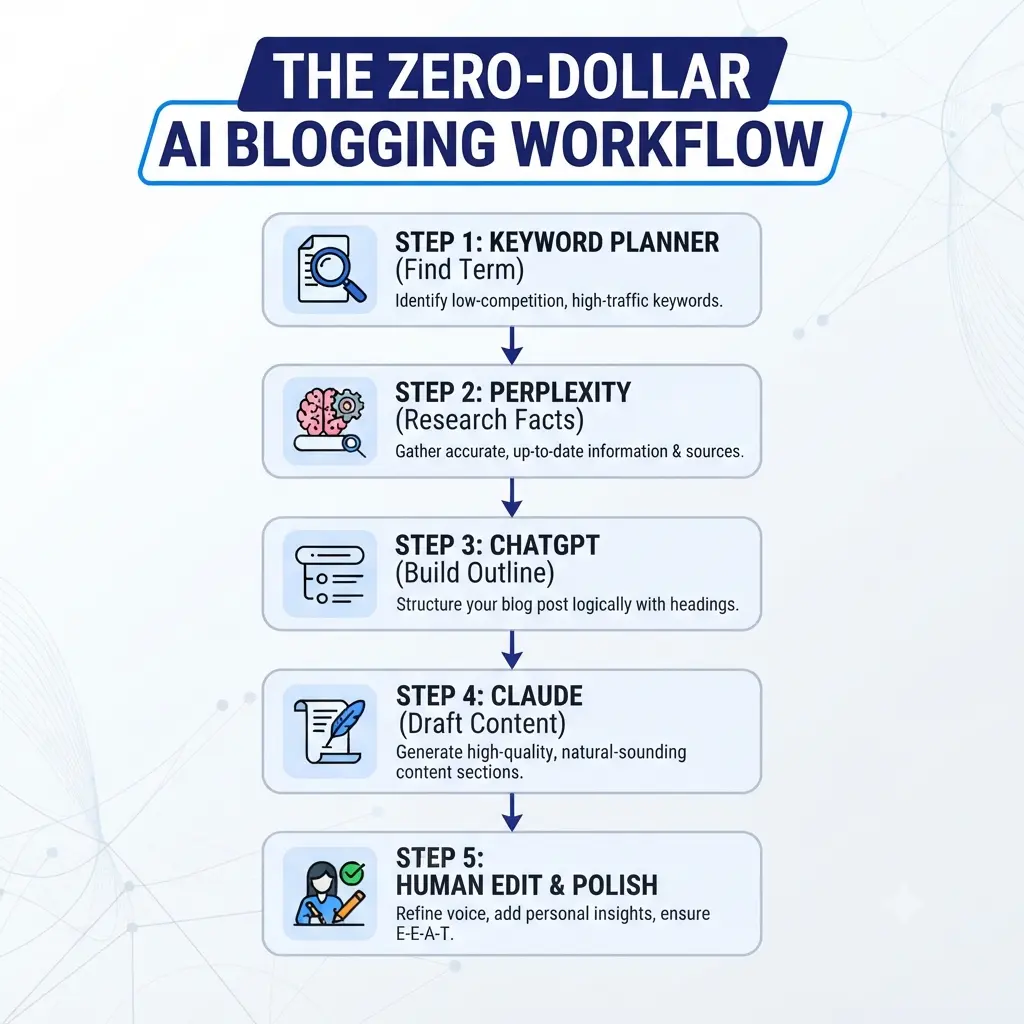
Which AI tool should a new blogger start with?
You don’t need all seven.
If research is slowing you down, start with Perplexity. If you struggle with ideas and outlines, ChatGPT can help. If drafting takes too long, Claude is worth considering. For a WordPress blog, Rank Math can help with on-page SEO, while Canva and Grammarly handle visual and editing tasks.
The best choice depends on where your blogging workflow is currently getting stuck.
1. Perplexity — Best for Blog Research
Best for: Topic research, source discovery, and exploring unfamiliar subjects
Before you write a blog post, you need to understand the topic. That’s where Perplexity can be useful.
Rather than asking an AI tool to immediately write an article, you can use Perplexity during the research stage to explore a subject, find relevant sources, compare information, and identify questions worth answering.
What can bloggers use Perplexity for?
You can use it to:
- Research an unfamiliar topic
- Find sources to investigate
- Discover questions readers may have
- Compare different viewpoints
- Find recent information
- Build a research brief
- Identify facts that need verification
- Explore content angles before creating an outline
For example, instead of asking:
“Write a blog post about AI tools for bloggers.”
Try a research-focused prompt:
“Research how bloggers are currently using AI for topic research, outlining, writing, editing, SEO, and visual content. Identify useful workflows for beginner bloggers and provide reliable sources I should verify.”
This gives you information to evaluate before writing rather than simply handing the entire article over to AI.
How should bloggers use Perplexity?
A useful workflow is:
Research → Verify sources → Extract useful information → Create your own outline → Write
Don’t treat an AI answer as your final source of truth. Open important sources yourself, especially when you’re using statistics, product information, prices, or claims that could change.
Perplexity free access
Perplexity provides free access, although features and usage limits can change. For a new blogger, the free option can be enough to experiment with AI-assisted research before deciding whether a paid plan is necessary.
Pros
- Speeds up initial research
- Helps discover sources
- Useful for unfamiliar topics
- Can uncover related questions
- Helpful for building research briefs
Cons
- AI answers still need verification
- Free usage has limits
- It shouldn’t replace reading important sources
- Search results don’t automatically equal expert judgment
Who should use Perplexity?
Choose Perplexity if research is one of the slowest parts of your blogging process. It’s particularly useful when you need to understand a topic before creating your own outline and article.
Verdict: Perplexity is most valuable as a research assistant, not an automatic blog-post generator.
Best Free AI Tools for Research Paper Writing (Plagiarism-Free)
2. ChatGPT — Best for Ideas, Outlines, and Content Planning
Best for: Brainstorming, outlining, content planning, and turning rough ideas into structured drafts
ChatGPT is useful throughout the blogging process, but one of its strongest uses for beginners is content planning.
Instead of asking it to produce a finished article and publishing the result, you can use it to turn a rough idea into a structured plan that you then improve with your own research and expertise.
What can bloggers use ChatGPT for?
Common uses include:
- Generating blog topic ideas
- Expanding rough ideas
- Creating article outlines
- Turning research notes into sections
- Brainstorming examples
- Creating FAQ ideas
- Rewriting unclear passages
- Creating headline variations
- Repurposing existing content
For example, if your topic is best AI tools for bloggers, you could ask:
“Create a beginner-friendly outline for an article about AI tools for bloggers. Organize it around the problems bloggers need to solve rather than simply listing software. Include sections for research, planning, writing, editing, SEO, and visual content.”
That’s more useful than:
“Write me a 3,000-word SEO article.”
The first prompt helps you think and structure. The second encourages you to outsource the entire editorial process.
How can ChatGPT help with SEO content?
ChatGPT can help you organize information around search intent, generate related questions, create comparison tables, and identify areas that may need further research.
But don’t ask it to invent search volume, rankings, user experience, or product capabilities.
Use real SEO data and sources for those decisions, then use AI to help organize the information.
ChatGPT free access
ChatGPT has a free tier, although access to specific features and usage limits can change over time.
For a new blogger, that makes it useful for brainstorming, planning, and occasional writing assistance without immediately committing to another monthly subscription.
Pros
- Versatile
- Excellent for brainstorming
- Useful for outlines
- Helpful for rewriting and organizing ideas
- Can assist with many stages of blogging
Cons
- Output can become generic without good instructions
- Important facts need verification
- It can encourage over-reliance if you use it to write everything
- Free usage limits can change
Who should use ChatGPT?
ChatGPT is a strong starting point if you’re new to AI-assisted blogging and want one general-purpose tool that can help with planning, brainstorming, and writing support.
Verdict: Use ChatGPT to make your blogging process faster—not to remove your role as the writer and editor.
ChatGPT Guide for Beginners: Hidden Features, Best Prompts & Real Ways to Use It
3. Claude — Best for Long-Form Drafting and Rewriting
Best for: Drafting, rewriting, summarizing, and working with longer pieces of text
Claude is another useful option for bloggers who want AI assistance with long-form writing.
Its value isn’t simply that it can produce paragraphs quickly. It can also help you work through existing notes, drafts, and larger amounts of text when you’re revising an article.
What can bloggers use Claude for?
You can use Claude to:
- Turn an outline into a first draft
- Rewrite awkward paragraphs
- Improve transitions
- Condense repetitive sections
- Expand an explanation
- Compare different versions of a paragraph
- Summarize research notes
- Improve the structure of an existing draft
For example, instead of:
“Write a complete article about AI blogging tools.”
Give Claude your actual outline and instructions:
“Using this outline, create a first draft in a clear, beginner-friendly style. Don’t invent statistics or product claims. Mark places where additional research or a personal example would strengthen the article.”
You then take that draft through your own editing and fact-checking process.
Claude vs. ChatGPT for blogging
Both can support blogging, so you don’t necessarily need both.
A simple way to decide is:
- Choose ChatGPT if you want broader brainstorming and general-purpose assistance.
- Choose Claude if your main need is working with longer drafts, rewriting, and editing.
Your choice should depend on your workflow rather than which tool has the longest feature list.
Claude free access
Claude offers free access with usage limitations that can vary. Check its current limits before relying on it as your only writing tool.
Pros
- Useful for long-form drafts
- Strong rewriting assistance
- Helpful for working with existing text
- Good for organizing longer pieces
Cons
- Free usage is limited
- AI drafts still require human editing
- It can produce generic content if the input is generic
Who should use Claude?
Claude is worth considering if you already have a clear outline and need help turning it into or improving a longer draft.
Verdict: Claude works best as a drafting and rewriting assistant. Your research, examples, opinions, and final editorial decisions should remain yours.
Best AI writing tool for long-form blog posts without subscription
4. Rank Math — Best for WordPress SEO
Best for: On-page SEO, metadata, internal linking checks, and WordPress content optimization
Rank Math is different from the AI writing tools above. It doesn’t replace your writing assistant.
Instead, it’s useful after or during the writing process because bloggers need to optimize their published content for search engines as well as create it.
What does Rank Math do for bloggers?
Depending on the features available in your version, Rank Math can help you work with:
- SEO titles
- Meta descriptions
- Focus keywords
- URL structure
- Internal links
- Schema markup
- Search previews
- Basic on-page SEO checks
For example, after creating an AI-assisted draft, you can use Rank Math to check whether important on-page elements are in place.
But don’t blindly chase a plugin score.
A page can receive a strong SEO score and still fail to satisfy the reader’s search intent.
How should bloggers use Rank Math with AI?
A better workflow is:
Research → Write → Edit → Match search intent → Optimize with Rank Math → Final human review
Use the plugin as a checklist, not as a substitute for SEO judgment.
Rank Math free vs. paid
Rank Math has a free version, while additional features are available through paid plans. The exact feature set can change, so check the current offering before making a purchase decision.
Pros
- Built for WordPress
- Helpful on-page SEO checks
- Useful for metadata and structured SEO tasks
- Free version available
Cons
- SEO scores aren’t ranking guarantees
- Can encourage over-optimization if followed blindly
- Some advanced features require paid plans
Who should use Rank Math?
If your blog runs on WordPress, Rank Math can be useful for keeping your basic on-page SEO organized.
Verdict: Use Rank Math to support your SEO workflow, but prioritize search intent, useful content, internal linking, and reader experience over achieving a perfect plugin score.
5. Canva — Best for Blog Graphics
Best for: Featured images, blog graphics, Pinterest content, and visual assets
A blog post doesn’t have to be entirely text.
Useful visuals can make an article easier to understand and give readers something they can save or share. Canva is a practical option for creating those graphics without needing professional design software.
What can bloggers create with Canva?
You can create:
- Featured blog images
- Comparison graphics
- Infographics
- Step-by-step visuals
- Pinterest pins
- Social media graphics
- Simple diagrams
- Content upgrades
For example, an article about AI blogging tools could include a visual showing:
Research → Outline → Draft → Edit → SEO → Publish
That can communicate the workflow faster than several paragraphs of explanation.
How should bloggers use Canva?
Don’t add images simply because an article is supposed to have images.
Instead, ask:
Does this visual help the reader understand, remember, or use the information?
If yes, create it.
If not, skip it.
Canva free access
Canva provides a free plan with a range of templates and design features. Some advanced assets and capabilities require a paid plan.
Pros
- Beginner-friendly
- Useful for blog visuals
- Good for Pinterest graphics
- Large template library
- Free option available
Cons
- Some assets require payment
- Templates can look generic without customization
- Creating visuals still takes time
Who should use Canva?
Canva is a strong choice if you want to make better blog visuals or turn your articles into shareable Pinterest content without hiring a designer.
Verdict: Canva is particularly useful for bloggers who want their written content to work across both search and visual platforms.
Best AI Image Generation Tools for Beginners, Bloggers & Creators
6. Grammarly — Best for Editing AI-Assisted Content
Best for: Grammar, clarity, spelling, and polishing drafts
AI can produce fluent writing that still feels repetitive, awkward, or unlike your normal voice.
That’s why editing should remain an important step in an AI-assisted blogging workflow.
Grammarly can help catch common writing problems and make a draft easier to read.
What can Grammarly improve?
Depending on the available features, you can use it to check:
- Grammar
- Spelling
- Punctuation
- Sentence clarity
- Wordiness
- Tone
- Readability
It’s particularly useful after you’ve created a first draft with an AI writing assistant.
How should bloggers edit AI-generated drafts?
Don’t simply click through every suggested correction.
Read the article yourself.
Look for:
- Repeated ideas
- Generic statements
- Unsupported claims
- Unnatural phrases
- Missing examples
- Incorrect facts
- Sections that don’t answer the reader’s question
Then use Grammarly for the final language polish.
Grammarly free access
Grammarly offers a free plan for basic writing assistance, with additional capabilities available through paid plans.
Pros
- Easy to use
- Useful for proofreading
- Helps improve clarity
- Works well as a final editing layer
Cons
- Doesn’t replace human editing
- Some advanced suggestions are paid
- Grammar correction doesn’t guarantee good content
Who should use Grammarly?
Use Grammarly if your biggest problem is polishing drafts rather than generating them.
Verdict: Grammarly is most useful at the end of the workflow, after you’ve added your own ideas and reviewed the substance of the article.
7. Google Keyword Planner — Best for Keyword Research
Best for: Discovering search terms and estimating keyword demand
Google Keyword Planner isn’t an AI writing tool. I’m including it because keyword research is one of the most important parts of an AI-assisted blogging workflow.
AI can help you brainstorm hundreds of topics, but that doesn’t mean people are actually searching for them.
Keyword Planner gives you real search-related data to help inform your topic selection.
Why should bloggers use Keyword Planner?
You can use it to:
- Discover keyword ideas
- Find related search terms
- Explore different keyword variations
- Estimate search volume ranges
- Build a list of topics to investigate further
For a new blog, don’t simply chase the keywords with the highest search volume.
A better approach is to find relevant queries where the current results appear beatable and where your article can provide something genuinely better.
How can you combine Keyword Planner with AI?
Use the tools for different jobs:
Keyword Planner → identify search terms
Google search → analyze the current results
AI → expand ideas and organize research
You → decide whether the topic is actually worth publishing
This is much stronger than asking an AI tool to invent keywords and assuming every suggestion is valuable.
Is Google Keyword Planner free?
Google Keyword Planner is available through Google Ads. Access and functionality can depend on how the account is configured and used, so check Google’s current requirements when setting it up.
Pros
- Useful for keyword discovery
- Comes from Google’s advertising ecosystem
- Helpful for building keyword lists
- Free to access
Cons
- Designed primarily for advertisers
- Search-volume data may be presented as ranges
- It doesn’t tell you whether your site can rank
- You still need SERP analysis
Who should use Keyword Planner?
Use it if you’re serious about choosing blog topics based on search demand rather than guessing what people might search for.
Verdict: Keyword Planner works best alongside actual Google SERP analysis and human judgment.
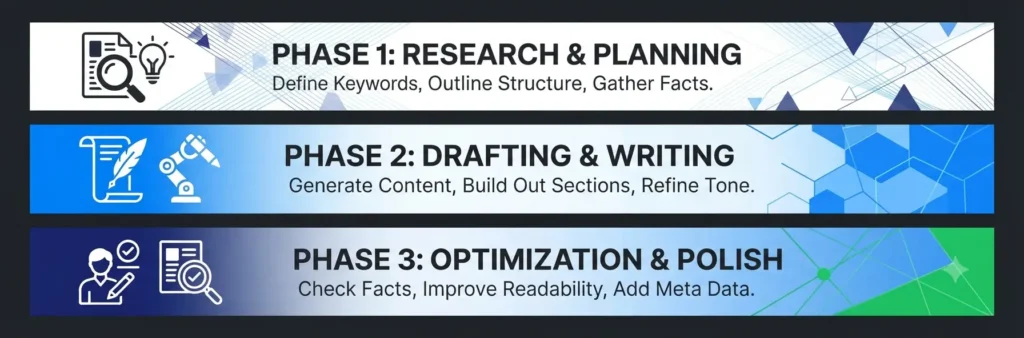
How to Use AI Tools for Blogging From Start to Finish
The biggest mistake beginners make is treating AI tools as separate pieces of software.
The real advantage comes from connecting them into a workflow.
Step 1: Find a topic
Start with keyword research.
Use Google Keyword Planner to discover relevant terms, then manually examine Google results to determine whether the topic fits your site and whether you can create a better result.
Step 2: Research the topic
Use Perplexity to explore the subject and locate sources worth investigating.
Don’t copy its answer into your article. Use it to understand the topic and identify information you need to verify.
Step 3: Create an outline
Use ChatGPT to organize your research into a logical structure.
Ask:
“Based on this research, create an outline that answers the searcher’s main question first. Remove sections that don’t directly help the reader and identify where an original example would make the article more useful.”
Step 4: Create a first draft
Use Claude or ChatGPT to turn your outline and notes into a starting draft.
The important word is starting.
The first AI draft shouldn’t automatically become the published article.
Step 5: Add original value
This is the step AI cannot replace.
Add:
- Your own examples
- Your own observations
- Screenshots
- Original comparisons
- Real workflows
- Personal recommendations
- Information you verified yourself
This is where a generic AI draft becomes a useful blog article.
Step 6: Edit and fact-check
Use Grammarly to help polish the language, but manually check the substance.
Verify product features, prices, statistics, dates, and other information that can change.
Step 7: Optimize for SEO
Use Rank Math to check basic on-page elements.
Then manually review:
- Search intent
- Title
- Headings
- Internal links
- Keyword relevance
- Readability
- Page experience
Step 8: Create useful visuals
Use Canva to create a featured image or supporting graphics when they genuinely improve the article.
The result is a workflow like this:
Keyword research → Research → Outline → Draft → Human editing → SEO → Visuals → Publish
That’s far more useful than asking one AI tool to write and publish an entire article automatically.
Can You Build a Blog With Free AI Tools?
Yes. A new blogger can start with a largely free AI-assisted workflow instead of immediately paying for several premium subscriptions.
A simple $0 starting stack
| Blogging task | Starting tool |
|---|---|
| Keyword research | Google Keyword Planner |
| Topic research | Perplexity |
| Ideas and outlines | ChatGPT |
| Drafting | ChatGPT or Claude |
| Editing | Grammarly |
| WordPress SEO | Rank Math |
| Blog graphics | Canva |
The exact free features and usage limits of these products can change, so treat the table as a starting point rather than a permanent pricing guarantee.
When should you pay for an AI tool?
Don’t subscribe just because a tool has more features.
Consider paying when:
- You repeatedly hit a free usage limit
- A feature saves significant time
- You use the tool frequently
- The paid feature directly improves your workflow
- Your blog revenue justifies the cost
For a new site, keeping your initial software costs low can be more sensible than building a large subscription stack before you know which tools you actually use.
How to Use AI for Blogging Without Hurting Content Quality
AI can save bloggers significant time, but using it responsibly matters.
Don’t publish raw AI drafts
An AI-generated draft is a starting point, not automatically a finished article.
Read it, fact-check it, remove repetition, and add information that makes the article genuinely useful.
Add original information
A generic explanation can be produced by hundreds of websites.
Your article becomes more valuable when you add:
- Original examples
- First-hand observations when available
- Screenshots
- Testing results
- Specific comparisons
- Clear recommendations
Fact-check important claims
AI tools can make mistakes or provide outdated information.
Always verify information such as:
- Prices
- Product features
- Statistics
- Dates
- Policies
- Technical specifications
Match the search intent
Don’t write 3,000 words because you think longer content ranks better.
First ask:
What does the person searching this keyword actually need?
For this keyword, the reader wants to compare tools and decide which ones are worth using.
Edit for your own voice
AI often produces predictable phrases and repetitive structures.
Rewrite sections that don’t sound natural to you.
Your perspective is one of the easiest ways to make AI-assisted content feel less generic.
Avoid mass-producing thin articles
Using AI to create dozens of barely useful pages isn’t the same as building a useful website.
A better strategy is to publish fewer articles that thoroughly answer real questions, then connect them through a coherent topic cluster.
Which AI Tool Is Best for Your Blogging Task?
If you don’t want to use all seven tools, start with the one that solves your biggest problem.
| If you need to… | Start with |
|---|---|
| Research a topic | Perplexity |
| Find content ideas | ChatGPT |
| Build an outline | ChatGPT |
| Draft or rewrite long content | Claude |
| Optimize WordPress SEO | Rank Math |
| Edit your writing | Grammarly |
| Create blog graphics | Canva |
| Research keywords | Google Keyword Planner |
The simplest starting setup
If you’re completely new to AI-assisted blogging, you don’t need seven subscriptions.
Start with:
Google Keyword Planner + one AI assistant + Rank Math
Then add other tools only when you encounter a specific need.
That keeps your workflow simple and prevents you from spending more time managing AI tools than actually creating content.
Frequently Asked Questions
What is the best AI tool for writing blog posts?
ChatGPT and Claude are two strong options for AI-assisted blog writing. ChatGPT is particularly useful for brainstorming and outlining, while Claude can be useful for drafting and rewriting longer content. Neither should replace research, fact-checking, original examples, or final human editing.
What are the best free AI tools for bloggers?
ChatGPT, Claude, Perplexity, Canva, Grammarly, and Rank Math all offer free access or free versions that can support different parts of a blogging workflow. Google Keyword Planner can also help with keyword research. The best combination depends on which blogging tasks take you the most time.
Can Google detect AI-generated blog content?
AI-generated text can potentially be identified by automated systems, but the more important issue for bloggers is whether the finished content is useful, accurate, original, and created to genuinely help readers. Using AI as an assistant while adding research, expertise, examples, and human editorial review is a more sustainable approach than publishing large amounts of unedited AI text.
How do I use AI for SEO blogging?
Use AI to assist with tasks such as brainstorming, research organization, outlining, rewriting, and content analysis. Use actual keyword and SERP research to choose topics, then optimize the finished article around search intent rather than simply inserting keywords.
Can I start a blog using only free AI tools?
Yes, you can start with free tools. A basic workflow can combine Google Keyword Planner for keyword research, Perplexity for research, ChatGPT or Claude for planning and drafting, Grammarly for editing, Rank Math for WordPress SEO, and Canva for visuals. As your workflow grows, you can decide which paid features are actually worth the cost.
Final Verdict
The best AI tools for bloggers aren’t necessarily the most expensive ones or the tools with the longest feature lists.
For a new blogger, the better approach is to build a simple AI-assisted workflow around the tasks that take the most time.
Use Google Keyword Planner to find potential topics, Perplexity to research them, ChatGPT to plan the content, and Claude when you need drafting or rewriting help. Then use Grammarly to polish the writing, Rank Math to handle basic WordPress SEO, and Canva to create useful visuals.
Most importantly, don’t let AI replace the parts of blogging that make your content worth reading. Research, judgment, original examples, fact-checking, and human editing are what turn AI assistance into a genuinely useful blog post.